Quick answer: SelfHostedClip is an independent comparison site and self-hosting guide for open source AI video clippers — it is not a cloud clipper, and it never receives your video. Every interactive part of the site (the five-project matrix, the GPU-vs-CPU render-time estimator, the Docker .env builder) runs in your browser with no account, no upload and no usage cap. To actually cut clips you run one of the five open source projects below on your own machine; if you would rather install nothing, compare the hosted clippers instead.
An open source AI video clipper is a self-hostable software pipeline that ingests long-form horizontal recordings—podcasts, livestream VODs, interviews, webinars, and technical talks—and automatically slices them into vertical 9:16 clips for YouTube Shorts, TikTok, and Instagram Reels on your own hardware. Instead of paying recurring monthly minute quotas on closed cloud platforms, you run speech transcription, viral hook detection, active-speaker face tracking, and word-synced subtitle rendering locally via Docker, Python, or WebGPU.
What Is a Self-Hosted Open Source AI Video Clipper (and What Does It Solve)?
Commercial cloud clippers such as OpusClip ($15/month Starter), Vizard ($14.50/month yearly), and Klap ($14/month yearly) bundle speech-to-text, LLM prompt scoring, and vertical video cropping behind metered upload credits. Free tiers typically stamp watermarks, cap monthly upload minutes, or expire exported files after a few days.
Deploying an open source AI video clipper on your own workstation, Mac, or Linux home server replaces that black-box subscription with five transparent, modular stages:
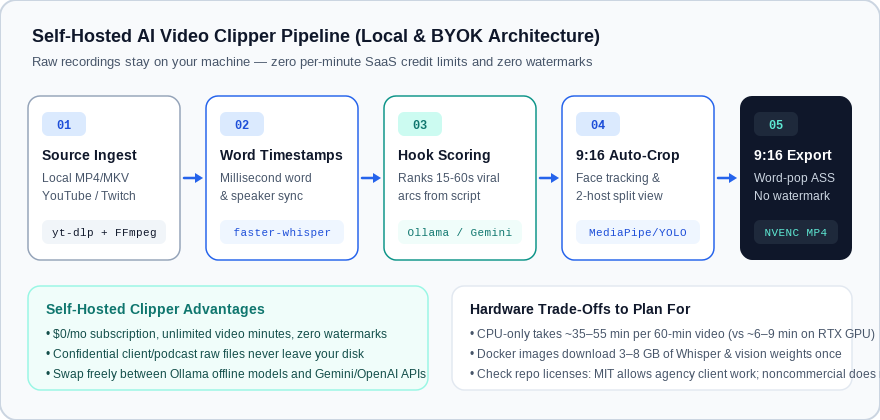
- Eliminates per-minute upload caps and watermarks: Whether you process two podcast episodes a month or 60 hours of Twitch and Kick VODs a week, local
FFmpeg and faster-whisper containers never meter your source minutes or burn promotional logos onto exported MP4s.
- Keeps raw recordings and NDA client footage on your disk: Agencies, internal company all-hands teams, and creators handling unreleased interviews can transcribe with local Whisper weights and score moments through local
Ollama models (qwen2.5 or llama3.1) so zero frames or transcripts leave the local network.
- Avoids vendor lock-in with BYOK and local models: Every leading open source AI video clipper lets you swap between free-tier Google Gemini Flash keys, OpenAI-compatible endpoints, or 100% offline Ollama servers without rewriting your editing workflow.
- Automates tedious 16:9-to-9:16 speaker reframing: Computer-vision trackers (
MediaPipe, YOLOv8, and Pyannote speaker diarization) keep talking heads centered inside a vertical crop and switch to stacked split-screen layouts when two podcast hosts speak back and forth.
All 5 Open Source AI Video Clippers at a Glance (2026)
If you want to see every active self-hostable option side by side before testing hardware speeds, here are the five open-source AI video clippers we track (how we verify licenses & specs), their exact GitHub owner/repo slugs, source licenses, and fastest deployment methods:
| Project |
GitHub Repository |
License |
Fastest Setup |
Best For |
Project Guide |
| OpenShorts |
mutonby/openshorts |
MIT (Commercial OK) |
docker compose up --build (:5175) |
Agencies & 2-host video podcasts needing split 9:16 crop + MCP |
OpenShorts Setup & Review |
| SupoClip |
FujiwaraChoki/supoclip |
SupoClip Noncommercial (Own channel OK) |
docker compose up -d --build (:3107) |
Solo creators wanting 0–100 virality sub-scores & waveform studio |
SupoClip Setup & License |
| AutoClip |
zhouxiaoka/autoclip |
MIT (Commercial OK) |
docker compose up -d --build (:3000) |
Local-first YouTube, Bilibili & stream replay clipping with Ollama |
AutoClip Setup & Verdict |
| ClipsAI |
ClipsAI/clipsai |
MIT (Commercial OK) |
pip install clipsai (Python venv) |
Python developers scripting WhisperX + Pyannote 9:16 pipelines |
ClipsAI Python Guide |
| OpenReel Video |
Augani/openreel-video |
MIT (Commercial OK) |
Browser WebGPU or pnpm dev |
Zero-server multi-track browser editing with zero cloud uploads |
OpenReel Video Guide |
For the complete engineering specification matrix—including 9:16 camera-tracking modes, VRAM requirements, caption styling, and REST/MCP APIs—see our Open Source OpusClip Alternatives Comparison or browse the All Clippers & Tools Directory.
Real Input-to-Output Benchmark: Clipping a 60-Minute Podcast Locally
To set realistic hardware expectations before you run docker compose up, the table below shows what happens when you feed a real 62-minute, 1080p (16:9, 30 fps, 1.8 GB) two-host podcast MP4 into a Dockerized open source AI video clipper pipeline (faster-whisper medium + LLM hook scoring + MediaPipe 9:16 crop + FFmpeg H.264 word-synced subtitles):
| Metric / Stage |
NVIDIA RTX 4070 (12 GB VRAM) |
Apple M2 Pro (16 GB Unified) |
8-Core CPU Laptop / VPS (16 GB RAM) |
| 1. Word-Level Transcription |
~2 min 10 sec (CUDA float16) |
~5 min 40 sec (CPU/Accelerate) |
~18 min 30 sec (CPU int8) |
| 2. LLM Viral Moment Scoring |
~18 sec (Gemini Flash) / ~45 sec (Local Ollama 14B) |
~18 sec (Gemini) / ~1 min 15 sec (Ollama) |
~20 sec (BYOK API recommended on CPU) |
| 3. Face Tracking & 9:16 Crop |
~2 min 25 sec |
~5 min 10 sec |
~14 min 00 sec |
| 4. Burned Captions & MP4 Encode |
~1 min 50 sec (h264_nvenc) |
~4 min 20 sec (libx264) |
~11 min 40 sec (libx264 veryfast) |
| Total Wall-Clock Time |
~6.5 – 8.5 minutes |
~15 – 17 minutes |
~44 – 48 minutes |
| Finished Output Delivered |
8 to 12 standalone 1080x1920 MP4 clips (18–58s each), word-highlighted subtitles, hook titles, zero watermarks |
Same watermark-free 1080x1920 MP4 batch |
Same watermark-free 1080x1920 MP4 batch (best queued overnight) |
If your laptop lacks dedicated VRAM or Docker support, you can still cut vertical videos locally in your browser using OpenReel Video (WebCodecs + WebGPU) or offload only the LLM scoring call to a low-cost API key while keeping video rendering local. See our full Open Source OpusClip Alternatives Comparison for frame-rate, caption template, and memory breakdowns across all five repositories.
How to Pick and Launch the Right Self-Hosted Clipper in 3 Steps
- Match your license to how you monetize: Not every repository labeled open source uses a permissive license. OpenShorts, AutoClip, ClipsAI, and OpenReel Video ship under the MIT License, which permits commercial agency client work and internal business deployment. SupoClip uses the SupoClip Noncommercial Source License—free for personal use and individual creators clipping for their own monetized channels, while agencies and client services require written permission. Read our OpenShorts vs SupoClip Self-Hosted Review for a side-by-side breakdown.
- Choose between a web studio, Python SDK, or browser editor: Pick OpenShorts or SupoClip if you want a full web dashboard with transcript-based trimming and MCP agent endpoints; pick AutoClip if you clip both YouTube and Bilibili/local replays; pick ClipsAI if you want a clean Python library (
ClipFinder + resize) inside your own automation script; or pick OpenReel Video for zero-install multi-track browser editing.
- Generate your
.env and launch Docker Compose: Use the quickstart box in the matcher above—or open our step-by-step Self-Hosted AI Video Clipper Docker Guide—to configure CUDA GPU passthrough, Whisper model size, and local Ollama endpoints in under ten minutes.
SelfHostedClip: Direct Answers (Free, Uploads, Browser, Mobile, Limits)
Every repository, licence and speed figure on this page was re-verified against the project's own repo, LICENSE file and latest release on 28 November 2026 — the method is described in how we verify.
Is SelfHostedClip completely free, and do I need an account?
It is free and there is no account. SelfHostedClip has no login, no email wall, no subscription and no query or render quota — the comparison tables, the estimator and the .env builder are all open to anonymous visitors. The five projects it covers are free to self-host too, with one licence exception: SupoClip is noncommercial, so agency or client work needs written permission. Your only real costs are the machine you run it on and any paid API key you choose to plug in.
Does SelfHostedClip upload or store my video files?
No — there is no upload field and no video storage anywhere on the site. The estimator only takes numbers you type, the .env builder only outputs text you copy, and every table is static HTML. Because no backend receives media, there is nothing to retain, leak or train a model on; the privacy terms are spelled out in our Privacy Policy. Where your footage actually goes is your own machine — and if you pair a project with a local Ollama model, it never leaves your network either.
Can I use it in my browser, on my phone, without installing anything?
The site: yes. It is a plain web page that works in Chrome, Edge, Safari and Firefox on desktop, Android and iPhone, and installing nothing is required. The clipping is a different story — Whisper transcription and 9:16 face tracking want a desktop CPU or GPU, 16 GB of RAM and some disk space, so realistically your phone is where you compare projects and prepare a config, while your laptop, desktop or home server is where you run Docker Compose. One project, OpenReel Video, does its editing inside the browser via WebCodecs and WebGPU, so a desktop browser alone is enough for that one.
How do I start as a complete beginner?
- Pick by licence and hardware in the table above — MIT for client work, SupoClip's noncommercial licence for your own channels, OpenReel if you have no GPU.
- Copy the matching
.env out of the builder on this page.
- Run the Docker Compose command from that project's row, following our Self-Hosted AI Video Clipper Docker Guide.
- Feed it one 30–60 minute episode, check the transcript and the burned captions, then batch — a first run takes roughly 38–55 minutes on an 8-core CPU laptop and 6–9 minutes on an NVIDIA RTX GPU.
Are there daily limits, file-size limits or other restrictions?
SelfHostedClip imposes none: no daily cap, no file-size ceiling, no paywall, no upgrade-to-export. The limits you will feel are physical and are not ours to raise — a 62-minute 1080p episode takes roughly 38–55 minutes end to end on an 8-core CPU laptop with 16 GB of RAM versus 6–9 minutes on an NVIDIA RTX GPU, so long batches are best queued overnight. If you want limits that someone else enforces and pays for, that is what hosted plans are for.
How does SelfHostedClip compare with OpusClip, Vizard and Klap?
They do different jobs. OpusClip ($15/month Starter), Vizard ($14.50/month billed yearly) and Klap ($14/month billed yearly) run the pipeline on their servers and charge by uploaded minutes, so you trade money for zero setup. SelfHostedClip clips nothing — it tells you which open source project to install, on what hardware, under which licence, so your cost is your own machine and electricity instead of a monthly quota. Rule of thumb: a few short videos a month and no GPU, use a hosted tool; weekly podcasts or client footage that cannot leave your disk, self-host. The full matrix is in OpusClip Open Source Alternatives Compared.
What are the best free alternatives to SelfHostedClip?
SelfHostedClip is not a clipper, so its alternatives are the clippers themselves: the five open source projects above are free to self-host — OpenShorts, AutoClip, ClipsAI and OpenReel Video under MIT, SupoClip under a noncommercial licence — with no watermarks and no monthly minute quotas. If self-hosting is more setup than you want, the hosted route is OpusClip, Vizard or Klap, whose free tiers typically stamp a watermark, cap upload minutes or expire exports. Browse every option we track in the All Clippers & Tools Directory. The long-form version of every question above — including phone support and the corrections policy — is on the SelfHostedClip FAQ; per-project data flow is on local vs cloud processing; licence rules are broken down on free and licences; and what a browser can honestly do is on browser and mobile.

No hardware notes posted on this page yet—be the first to share what GPU/CPU and Whisper model you run.